Configure an analog airspeed sensor
- Lalanne Laurent
- Harold Hankins
Introduction
Airspeed sensors are used for fixed wing setups and feed extra flight information for PathFollower or simply detect stall state.
This page describes how to setup an analog airspeed sensor using a Revolution, Revolution Nano, or Sparky2 board.
Other airspeed sensors that use the i2c port are already supported using the vehicle setup wizard.
Hardware
Airspeed sensors estimate the air speed using a differential pressure sensor and a pitot tube.
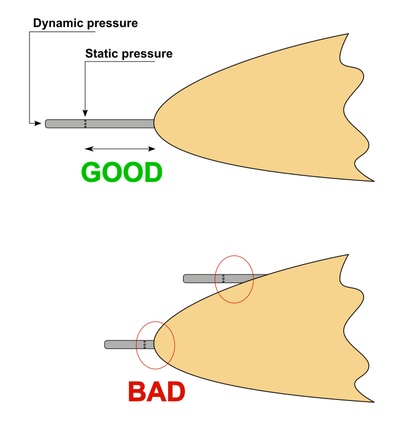
A pitot tube has two pipes, one for static pressure (side of tube) and other for dynamic pressure in front of the tube.
Two differential analog sensors are supported: MPXV7002DP and MPXV5004DP
Connections are pretty simple: Gnd, +5V, and analog voltage proportional to the airspeed.
The sensor can be connected to various ports, according to the board you use. See next part.
Sensor position
You may choose a good place for your pitot tube, the static pressure should not be disturbed by aerodynamic effects that artificially increase the static pressure due to a too close fuselage or wing.
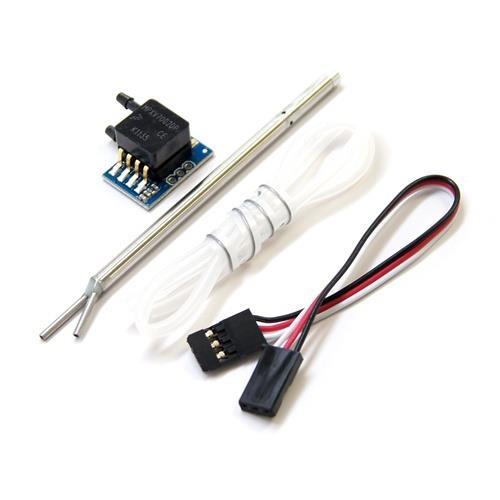
APM analog airspeed sensor
Select the analog input
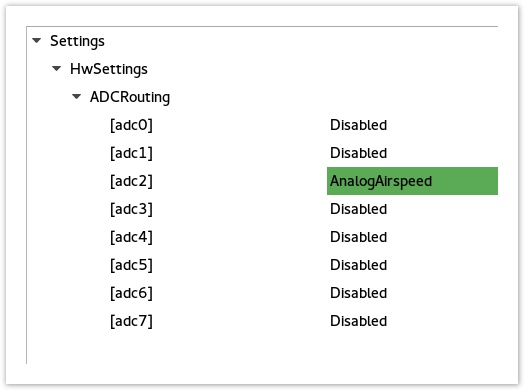
Go to System > UAVOBrowser > Settings > HwSettings > ADCRouting and select the adc input pin used for AnalogAirspeed function.
Output port 5 is a good choice for the airspeed input, it's still free to use for most fixed wing setups and easy to connect using a servo connector.
Here is the adc mapping for various boards:
| Board | adc0 | adc1 | adc2 | adc3 | adc4 | adc5 | adc6 |
|---|---|---|---|---|---|---|---|
| Revolution | PWR port pin 3 | PWR port pin 4 | Output port out 3 | Output port | Output_port | Output port | internal |
| Sparky2 | PWR port pin 3 | PWR port pin 4 | PWR port pin2 | Output port | Output port | Output_port | Output port |
| RevoNano | FlexiIO | FlexiIO pin 5 | FlexiIO pin 6 | FlexiIO pin 7 | FlexiIO pin 8 | Output_port out 5 | Output port out 6 |
FlexiIO refers to the receiver port
Configuring sensor
Choose sensor type
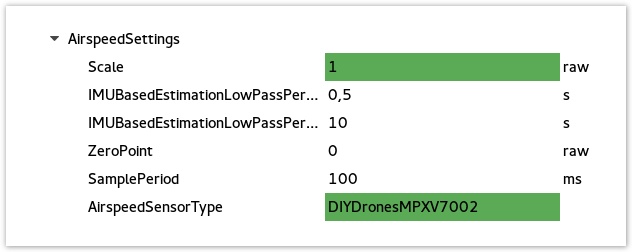
Go to System > UAVOBrowser > Settings > AirspeedSettings and select the sensor type you use: MPXV7002 or MPXV5004
Calibrate sensor
At this point you can do some flight testing and compare the average airspeed value and GPS ground speed using an OPlink.
Doing circles at a stabilized cruise speed you can notice the wind that increase airspeed when wind is in front and reduce airspeed when wind is on back, for almost similar ground speed from pilot point of view.
You may need to find the Scale value to measure a almost accurate airspeed value.
About analog sensors
Keep in mind those sensor are cheap, not really linear or temperature compensated.
As a side effect, the temperature can affect the ZeroPoint value set automatically at start up and when the sensor warm, this ZeroValue vary on sensor side.
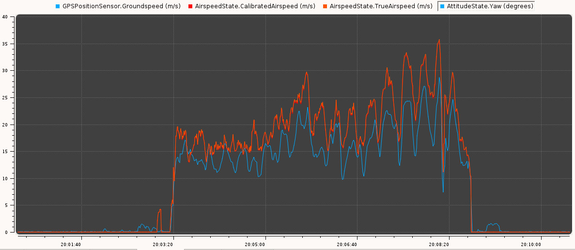
Almost calibrated sensor, the airspeed scale value still a little high.